cybersecurity for small business: Essential Protection Tips
Cybersecurity isn't just a line item on a big corporation's budget; it's an absolute must-have for any small business that wants to stay in business. Too many owners fall into the trap of thinking they're too small to be a target. This mistake is a goldmine for cybercriminals.
Why Your Small Business Is A Big Target

It's a dangerously common myth: "My business is too small for hackers to care about." The hard truth is, automated attack tools don't care about your size. Cybercriminals aren't sitting in a dark room hand-picking their victims one by one. They unleash software that constantly scans the internet for easy targets—things like out-of-date software or weak passwords—which puts every single business with a website or email address on their radar.
Think of it as a numbers game. To a hacker, you aren't a small fish swimming alone. You're part of a massive, easily accessible shoal that often has far weaker defences than a heavily guarded corporate giant. This makes you a high-reward, low-effort target, and that’s exactly what puts you in the crosshairs.
The True Cost of a Breach
The fallout from a cyber attack goes way beyond just the initial financial hit. Picture this: you walk into your office one morning, and every client file, invoice, and business record is locked up and unreadable. A message on the screen demands thousands of pounds to get them back. Just like that, your business is at a complete standstill.
This isn't a scene from a film; it happens to businesses every single day. The consequences can be devastating and often include:
- Financial Drain: The cost of downtime, paying for experts to fix the mess, and potential fines can be crippling.
- Reputational Damage: Nothing shatters customer trust faster than a data breach. Winning that trust back is a long, hard road.
- Operational Chaos: You can't serve your clients, you can't process payments, and your daily operations grind to a halt.
The scale of the problem is staggering. Small- and medium-sized enterprises (SMEs) in the UK face an estimated 65,000 hacking attempts daily. All told, cybercrime costs the UK economy around £27 billion annually. You can learn more about these UK cybersecurity statistics and what they mean for your business.
Shifting from Chore to Necessity
It's time to stop thinking of cybersecurity as a complicated technical chore. It’s a core business function, every bit as important as sales or customer service. The good news? You don't need a massive budget to build a solid defence.
This guide is your roadmap. We’ll walk you through everything from understanding the real threats to putting practical, affordable protections in place. It's about securing your money, your reputation, and your future.
Understanding the Top Cyber Threats You Face
Before you can build a solid defence, you first need to know what you’re up against. Cybersecurity for a small business isn't some vague, mysterious force; it’s about understanding a few common tricks and tactics that criminals use every day. Once you get your head around them, they become a lot less intimidating.
Think of it this way. Phishing is the digital equivalent of a con artist sending you a fake letter to trick you. Malware is like a burglar who finds an unlocked window and sneaks onto your computer. And ransomware? That’s a digital kidnapper holding your most valuable asset—your data—hostage until you pay up.
These aren't just hypotheticals; they are happening to businesses all over the UK right now. In fact, a recent report showed that over 61% of UK small businesses were hit by at least one cyberattack last year alone. Malware was the most common culprit, affecting 18% of them, with phishing nipping at its heels at 17%. These UK small business cybersecurity statistics really paint a clear picture of the risks involved.
To give you a clearer idea, here's a quick rundown of the most common threats you'll likely encounter.
Common Cyber Threats to UK Small Businesses
| Threat Type | What It Is | Small Business Example |
|---|---|---|
| Phishing | A scam where criminals pretend to be someone you trust (like your bank or a supplier) to trick you into sharing sensitive information. | An email arrives that looks like it's from HMRC, promising a tax rebate if you click a link and "verify" your bank details. |
| Malware | Malicious software (like viruses or spyware) designed to disrupt your operations, steal data, or spy on your activity. | An employee downloads a free "PDF converter" from an untrustworthy website, which secretly installs software that logs their keystrokes. |
| Ransomware | A type of malware that locks up all your files and demands a payment (a ransom) to release them. | You come into work on Monday to find a message on all your computers saying your files are encrypted and you must pay £2,000 in Bitcoin to get them back. |
As you can see, these threats aren't highly technical hacks; they often rely on simple human error. Let’s break them down a bit further.
Phishing: The Art of Deception
Phishing is all about social engineering. The criminals aren't trying to brute-force their way through your firewall with complex code; they're trying to fool you or your staff into opening the door for them. Their goal is almost always to steal login details, credit card numbers, or other sensitive data.
These scams can be incredibly convincing. We often see attacks in the UK that mimic official communications from HMRC or a familiar delivery service. Another classic is the "fake invoice" email from a supplier you work with all the time, asking you to pay an urgent bill to their "new" bank account.
The real trick behind phishing is that it creates a sense of urgency or curiosity. It pushes you to act first and think later. For concrete defences, see our step-by-step phishing prevention guide for small business.
Malware: The Unwanted Guest
Malware is just a catch-all term for malicious software. Think of it as anything a criminal might install on your computer to steal, spy, or just cause chaos. Once it’s on one of your systems, it can do all sorts of damage.
You’ll hear a few different terms for malware:
- Viruses: These little bits of code attach themselves to clean files and then spread from computer to computer, often corrupting data as they go.
- Spyware: Just like it sounds, this software sits quietly in the background and records what you do—logging passwords, financial details, and browsing habits.
- Trojans: These disguise themselves as legitimate programmes. You might think you're installing a useful tool, but it's actually creating a secret backdoor for an attacker to access your system.
A single mistaken click on a dodgy link or an infected email attachment is often all it takes for malware to get a foothold. The fallout can range from a sluggish computer to having confidential client data stolen, which can seriously damage your business and your reputation.
Ransomware: Your Data Held Hostage
Ransomware is a particularly nasty form of malware that has become a massive headache for small businesses. It works by encrypting your files—scrambling them so they are completely unreadable—and then demanding a hefty payment to give you the key to unlock them.
For any small business, this is a nightmare scenario. Imagine suddenly losing access to all your client records, your accounts, and your project files. Everything just stops. The attackers are betting that you'll decide paying the ransom is cheaper than going out of business.
The worst part? Paying up is no guarantee you’ll get your data back, and it flags you as an easy target for future attacks. The only real defence against ransomware is to make sure you never have to consider paying in the first place, which is why having rock-solid backups and good preventative security is non-negotiable. If you're looking for more practical ways to build up your defences, feel free to explore further articles on our blog. For a step-by-step plan, see our guide to ransomware protection for small business, with a 3-2-1 backup checklist and a first-60-minutes response list.
Building Your Essential Cybersecurity Defences
Knowing the threats is one thing, but actually building your shield is where you take back control. The good news? You don’t need a massive budget or a dedicated IT department to make a real difference. For a small business, strong cybersecurity begins with a few foundational, low-cost steps that create layers of protection.
Think of it like securing your home. You wouldn't just rely on a single lock on the front door, would you? You’d have a deadbolt, you’d lock the windows, and you might even have a security camera. Digital defence is exactly the same—every control you add makes it that much harder for a burglar to get inside.
The diagram below shows just how quickly a simple phishing email can spiral into a full-blown ransomware attack, highlighting the chain reaction you need to break.
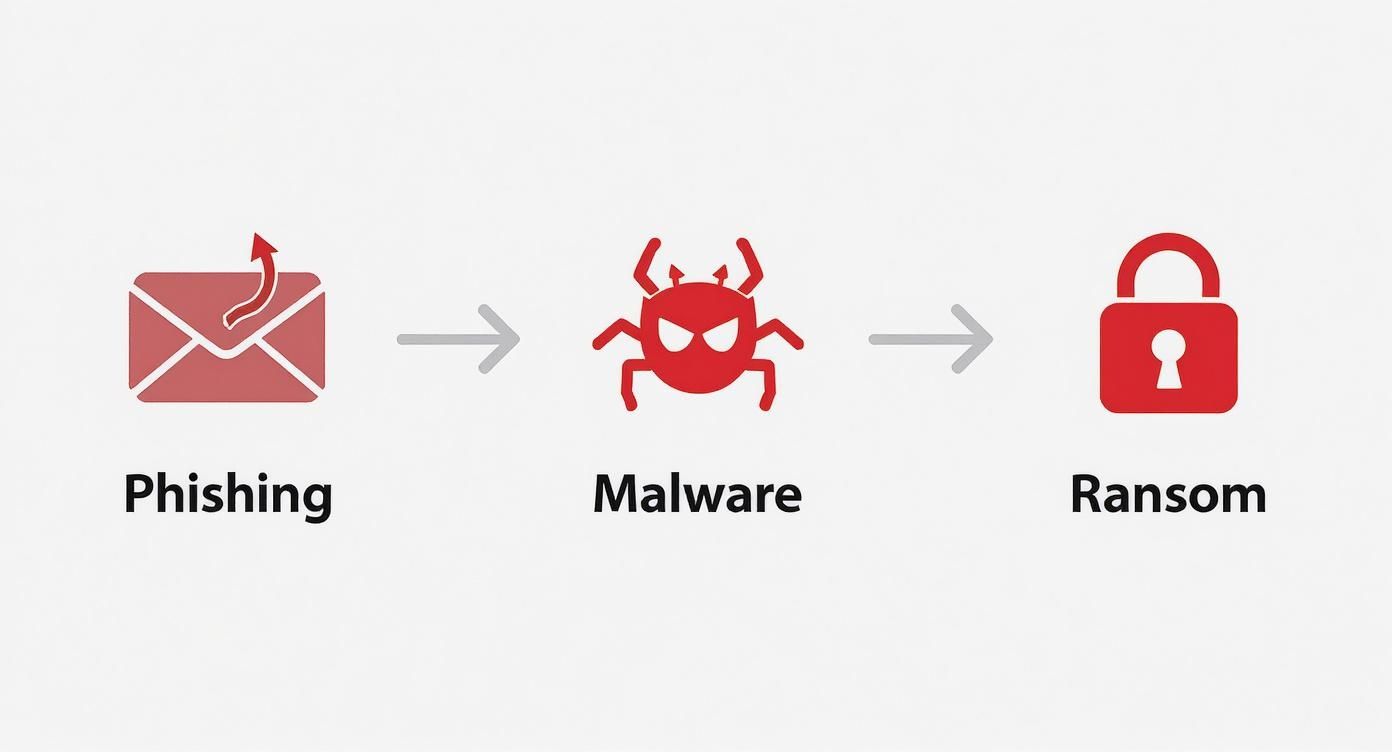
It’s a sobering reminder that a single click can open the door for malware, which then clears the path for a devastating attack that locks you out of your own data.
Fortify Your Digital Front Door
Your first, most crucial line of defence is managing who gets into your systems in the first place. Attackers love using stolen or weak passwords as their primary way in, so this is where you need to start.
It begins with a strong password policy. This isn't just about length; it's about making passwords unpredictable and unique for every single service.
- Enforce Complexity: Require a mix of upper and lower-case letters, numbers, and symbols.
- Mandate Length: Today, a password needs to be at least 12-14 characters long to be considered strong.
- Discourage Reuse: Make it a firm rule that employees must use a different password for every business app. No exceptions.
A password manager is your best friend here. It helps your team generate and store incredibly complex, unique passwords for every site without anyone having to remember a thing.
Add a Second Lock with Multi-Factor Authentication
Once your password game is strong, the very next step is to enable Multi-Factor Authentication (MFA) on everything you can. Think of MFA as a second, different type of lock on your digital door. Even if a criminal manages to steal your password (the first key), they still can't get in without that second factor.
Multi-Factor Authentication is one of the single most effective security controls you can implement. It forces anyone logging in to prove their identity in two or more ways, like with a password and a code from their phone. This simple step can block the vast majority of automated attacks cold.
Ready to switch it on? Our step-by-step guide to multi-factor authentication for small business covers which accounts to protect first, which methods to choose and how to set it up in Microsoft 365 and Google Workspace.
This second piece of proof is usually something only the real user has, such as:
- A code sent via text message to their phone.
- A pop-up approval on an authenticator app like Google Authenticator or Authy.
- A physical security key that you plug into a USB port.
Flick this on for all your critical accounts—especially email, banking, accounting software, and cloud storage.
Maintain Essential Technical Hygiene
You wouldn't drive your car for years without getting it serviced. Your software and systems need that same regular maintenance to stay secure. Cybercriminals are always scanning for businesses running out-of-date software because known security holes are like an open invitation.
Keeping your digital house in order comes down to a few key habits:
Keep All Software Updated: This means everything—your operating system (Windows, macOS), your web browser, and every business application you use. Whenever you see the option, turn on automatic updates. This ensures security patches are installed the moment they're available.
Install Reputable Antivirus Software: A good antivirus program is like a digital immune system, constantly scanning for and neutralising known malware and other nasty threats. Make sure it's installed on every computer and set to update its threat database automatically.
Use a Firewall: Most computers come with a built-in firewall, which acts as a gatekeeper for your network traffic. It watches what's coming in and what's going out, blocking anything that looks suspicious. Just double-check that it's switched on for all company devices.
Secure Your Network and Devices
Your office Wi-Fi network is another potential weak spot if it isn't configured properly. The router that beams out your internet connection needs to be locked down to protect everyone connected to it.
- Change Default Router Passwords: Never, ever stick with the default 'admin' username and password that came with your router. Change it immediately to something long and unique.
- Use Strong Wi-Fi Encryption: Check that your network is protected with WPA3 encryption (or WPA2 at a minimum). This scrambles all the data flying through the air, making it gibberish to anyone trying to eavesdrop.
- Create a Guest Network: If you offer Wi-Fi to customers or visitors, set them up on a separate guest network. This keeps their devices completely isolated from your main business network, so any potential threats on their phones or laptops can't jump across.
By putting these foundational controls in place, you build a tough, multi-layered defence that dramatically cuts your risk. Each step is another barrier, making your business a much harder—and less appealing—target for criminals.
Creating Your Data Backup and Recovery Plan
Even with the best defences, you have to assume that an attack might eventually get through. Good cybersecurity isn't just about building walls; it’s about having a solid plan for what to do if one of those walls is breached. This is where your focus shifts from just prevention to genuine resilience—your ability to get back on your feet quickly after a hit.
The reality is, threats are relentless. In the UK, around 43% of small and medium-sized businesses have faced at least one cyberattack in the last year, with phishing being the weapon of choice. This single statistic from Heimdal Security's latest report makes it clear why a recovery strategy is non-negotiable.
Having a plan ready to go can turn a potential catastrophe into a manageable incident. The two pillars of any good recovery plan are a clear incident response process and a rock-solid data backup system.
Prepare Your Cyber Fire Drill
When a fire alarm goes off, you don't stop to figure out where the exits are. You already know because you've practised the drill. An Incident Response Plan is your 'cyber fire drill'—a simple, clear checklist of what to do the moment you suspect something is wrong.
Panic is your worst enemy in a crisis. A written plan gets rid of the guesswork and makes sure you take the right steps, in the right order, to contain the damage.
Your plan doesn't need to be a hundred-page epic. You can start with a single page covering the absolute essentials:
- Who to call immediately: Is it your IT consultant or a dedicated cybersecurity firm? Have their name and number ready.
- How to disconnect: What are the exact steps to isolate an affected computer from the network to stop a threat from spreading?
- Who to notify internally: Who is the designated point person for managing internal communication with the team?
- When to inform customers: At what point do you need to communicate with clients, especially if their data is at risk? Our guide on handling data and privacy provides more context on these legal responsibilities.
Think of your Incident Response Plan as a business continuity tool. Its job is to minimise disruption, cut financial losses, and protect your reputation by ensuring you have a swift, organised, and effective response to any cyber incident.
You should practise this plan, even if it's just talking through a scenario with your team once a quarter. This simple exercise makes sure everyone knows their role when it really counts.
Implement the 3-2-1 Backup Rule
Your data is one of your most valuable assets. If ransomware locks your files or a hard drive suddenly dies, your backups are the only thing standing between a minor inconvenience and a business-ending disaster. The gold standard for protecting your data is the 3-2-1 Backup Rule.
It’s a simple but incredibly powerful strategy for making sure you can always get your information back. The concept is straightforward and gives you multiple layers of protection against data loss.
Here's how it works:
- Create THREE copies of your data. This means the original file on your computer plus at least two backups.
- Use TWO different formats or media types. For instance, you could have one backup on an external hard drive and another stored in the cloud. This protects you if one type of storage fails.
- Keep ONE copy offsite. This is the most crucial step. An offsite backup, usually in the cloud, protects your data from a physical disaster like a fire, flood, or theft that could destroy both your original data and your local backup in one go.
Following the 3-2-1 rule is your ultimate safety net. It builds genuine resilience into your business, ensuring that no single event—whether it’s a malicious attack or a simple hardware failure—can wipe out the data you depend on.
Smart Security Spending and When to Call in the Pros
Protecting your business doesn't mean you have to empty your bank account. For a small business, getting cybersecurity right is all about making smart, targeted decisions based on your actual risks, not just buying every tool on the market. It’s a common myth that proper security is wildly expensive, but honestly, some of the most powerful first steps cost you nothing at all.
Your starting point is simply using what you already have. Most operating systems and software suites (like Microsoft 365) come with solid built-in security features, such as firewalls and basic malware detection. Just switching these on is your first, completely free line of defence. From there, it's about making small, strategic investments that punch well above their weight in terms of protection.
Budgeting for Your Security Needs
There's no magic number for a cybersecurity budget—it really depends on your specific situation. A financial advisor handling sensitive client data will naturally need to invest more than a local coffee shop that mostly deals in cash. The most sensible approach is to put your money where your biggest risks are, starting with the controls that give you the most bang for your buck.
Think about your spending in layers:
- The Free Essentials: These are the absolute non-negotiables. Enable the firewalls that come with your computers, turn on automatic software updates, and create a strong password policy that requires multi-factor authentication.
- Modest (but Mighty) Investments: This next step includes crucial tools that don't cost the earth. Think of a subscription to a reputable antivirus program and a business-grade password manager to help your team keep track of credentials securely.
- Strategic Upgrades: As your business grows and your risks change, you might look at more advanced endpoint protection, invest in security awareness training for your staff, or sign up for a professional cloud backup service.
A recent study highlighted a worrying gap: 74% of small businesses put less than 10% of their total budget towards cybersecurity. This often happens because they underestimate just how crippling a security incident can be. Smart spending isn't about the total amount; it's about making sure every pound is aimed squarely at reducing your most significant risks first.
Knowing When to Bring in an Expert
A DIY approach can get you surprisingly far, especially when you're starting out. But there are definite signs that it’s time to call for professional help. Spotting these moments is key, because waiting too long can turn a small problem into a very expensive one. An expert isn't just an expense; they're an investment in your company's survival and future.
Think of it this way: you can probably fix a leaky tap yourself, but you’d call a plumber for a burst pipe, right? The same logic applies here. Cybersecurity consultants and managed service providers have specialised knowledge that can save you a world of time, money, and stress down the line.
The table below can help you figure out where you stand.
DIY Security vs Hiring an Expert
Use this comparison to gauge whether your current security tasks are manageable in-house or if it's time to seek professional guidance.
| Security Task | Good for DIY When... | Consider an Expert When... |
|---|---|---|
| Basic Setup | You're comfortable enabling built-in firewalls, MFA, and setting password rules for a small team. | You have multiple offices, a remote workforce, or need to configure a business-grade network securely. |
| Data Handling | You primarily handle non-sensitive information like customer names and email addresses. | You store or process sensitive data, such as financial records, health information, or confidential client files. |
| Compliance Needs | Your business doesn't fall under specific data protection regulations beyond standard GDPR. | You must comply with industry-specific regulations (like in finance or healthcare) and need to prove your security is up to scratch. |
| Time & Expertise | You have the time to research best practices and feel confident implementing basic tools correctly. | You're spending more time on IT headaches than on running your business, or you wouldn't know where to start if you had a security breach. |
If you find yourself ticking boxes in the "Consider an Expert" column, it's a clear signal that your business's needs are starting to outgrow a purely DIY strategy.
For those ready to explore what a professional partnership looks like, learning about services from a dedicated IT and AI consultancy like Lizzard Solutions can give you a much clearer picture of how tailored expertise can both protect and help scale your business.
Fostering a Security-First Culture in Your Team
Even with the most sophisticated software and hardware, you’re only halfway there. When it comes to protecting your small business, your people are your most critical line of defence. Cybercriminals know this all too well—it’s often far easier to trick an employee into clicking a bad link than it is to brute-force their way through a firewall.
This is precisely why nurturing a security-first culture isn't just a nice-to-have; it's essential. The goal is to shift everyone’s mindset from seeing security as some dry IT policy to viewing it as a shared responsibility. Think of it as building a digital neighbourhood watch, where every single person feels empowered to spot and report something that looks out of place. To put those expectations in writing, start from our IT security policy template for small business.
Turn Your Team into a Human Firewall
Building this kind of culture doesn't have to involve complicated or expensive training programmes. It all starts with making security a regular part of the conversation, not just a once-a-year tick-box exercise that everyone forgets. The trick is to keep the training practical, engaging, and directly tied to the kinds of threats your team will actually see in their inbox every day.
Here are a few effective ways to get the ball rolling:
- Run Practice Phishing Tests: Use a simple simulation tool to send fake phishing emails to your team. It’s one of the best ways to show them what a real attack looks like in a completely safe setting. This helps them learn to spot red flags, like urgent, unexpected requests for information or slightly 'off' email addresses.
- Hold Brief Security Reminders: You don’t need to schedule long, formal meetings. A quick five-minute chat during the weekly team huddle or a security tip in an internal newsletter keeps awareness top of mind. You could discuss a recent scam doing the rounds or just give a quick reminder about password best practices.
- Create Simple How-To Guides: Put together some easy-to-scan, one-page guides on key topics. Think "How to Spot a Phishing Attempt," "Creating a Strong Password," or "Staying Safe on Public Wi-Fi." A few visuals and clear bullet points go a long way.
The aim is to build muscle memory. The more your team practises identifying threats, the more instinctual their cautious behaviour becomes, significantly reducing the risk of a breach caused by simple human error.
Encourage Reporting Without Fear
One of the biggest roadblocks to a strong security culture is fear. If your team members are worried they’ll be blamed or punished for clicking a dodgy link or making a mistake, they’ll simply keep quiet about it. That silence is what can turn a small, easily contained incident into a full-blown disaster.
You have to create an environment where reporting a potential issue is celebrated, not penalised. Make it crystal clear that you would much rather investigate 100 false alarms than have the team miss one genuine threat.
Establish a dead-simple reporting process—it could be a dedicated email address (like security@yourcompany.co.uk) or a specific person to contact. Whenever someone does report something, thank them for being vigilant. This positive reinforcement shows everyone that it’s safe to speak up, making your entire organisation much more resilient. By turning your team into an active part of your defence, you transform your greatest potential vulnerability into your strongest asset.
Your Cybersecurity Questions, Answered
When you're running a small business, cybersecurity can feel like a maze of technical jargon. Let's cut through the noise and tackle some of the most common questions we hear from business owners just like you.
How Much Should We Really Spend on Cybersecurity?
There's no one-size-fits-all answer here, as your budget really depends on your specific level of risk. A financial services firm handling sensitive client data naturally has different needs—and a bigger budget—than a local retail shop.
A sensible approach is to earmark a small percentage of your total IT spend for security to start with. The key is to get the fundamentals right first. Before you even think about fancy, expensive tools, focus your initial investment on the high-impact essentials that give you the most bang for your buck, like multi-factor authentication and a rock-solid data backup plan.
Can't I Just Rely on Antivirus Software?
Honestly? No. Thinking antivirus is all you need is a common and dangerous mistake. Antivirus is absolutely a vital layer of your defence—think of it as a bouncer at the door checking for known troublemakers—but it's only one part of a much bigger security picture.
These days, threats are so sophisticated that no single tool can stop them all. True security comes from a layered defence. This means combining:
- A firewall to act as a gatekeeper for your network traffic.
- Prompt software updates to close security gaps before they can be exploited.
- Ongoing employee training to create a "human firewall" against clever phishing scams.
It’s like securing your office. You wouldn't rely on just one lock on the front door, would you? You'd have that, plus an alarm system, and maybe even security cameras. Each layer makes a potential intruder's job that much harder.
Your business's security is only ever as strong as its weakest link. Relying just on antivirus leaves too many other doors and windows unlocked for an attacker.
Is My Data Safe Just Because It's in the Cloud?
Using established cloud services like Microsoft 365 or Google Workspace gives you a massive security head start, but it doesn't make you invincible. Protecting your data is what we call a "shared responsibility".
The cloud provider (like Microsoft or Google) is responsible for securing their massive infrastructure—the physical data centres, servers, and global networks. That's their job. But you are always responsible for securing how your data and accounts are accessed within that environment.
It comes down to you to configure your settings properly, manage who has access to what, and enforce the use of strong passwords and multi-factor authentication. The provider gives you a fortress, but it's still up to you to lock the door to your own room.
Ready to build a security plan that truly protects your business and lets you focus on growth? Lizzard Solutions specialises in practical cybersecurity audits and support for small businesses. Book a free consultation today and let's map out a clear path to better security.
Prevention is only half the job. Prepare for the day something gets through with our incident response plan template for small businesses.